YouTube Key Moments Explained: How Chapters Rank in Google
What are YouTube Key Moments in Google Search? Learn how chapters become clickable search results, feed AI Overviews, and multiply your video's SEO reach.
TL;DR: Key Moments are a Google Search feature that turns your YouTube chapters into clickable search results. Each chapter can rank independently, meaning one video can appear for multiple search queries. In 2026, Key Moments also feed into Google’s AI Overviews. Adding keyword-rich chapters is one of the highest-leverage SEO moves for YouTube.
If you’ve ever Googled something and seen a video result with clickable timestamps underneath, labeled links that jump you to specific sections: those are Key Moments. They’re one of the most powerful and underused video SEO features available, and they’re driven almost entirely by the chapters in your video description.
What Are Key Moments?
Key Moments are a Google Search feature that breaks a single video result into multiple clickable segments. Instead of just a title and thumbnail, users see a list of specific sections with timestamps and labels. Clicking one jumps directly to that point in the video.
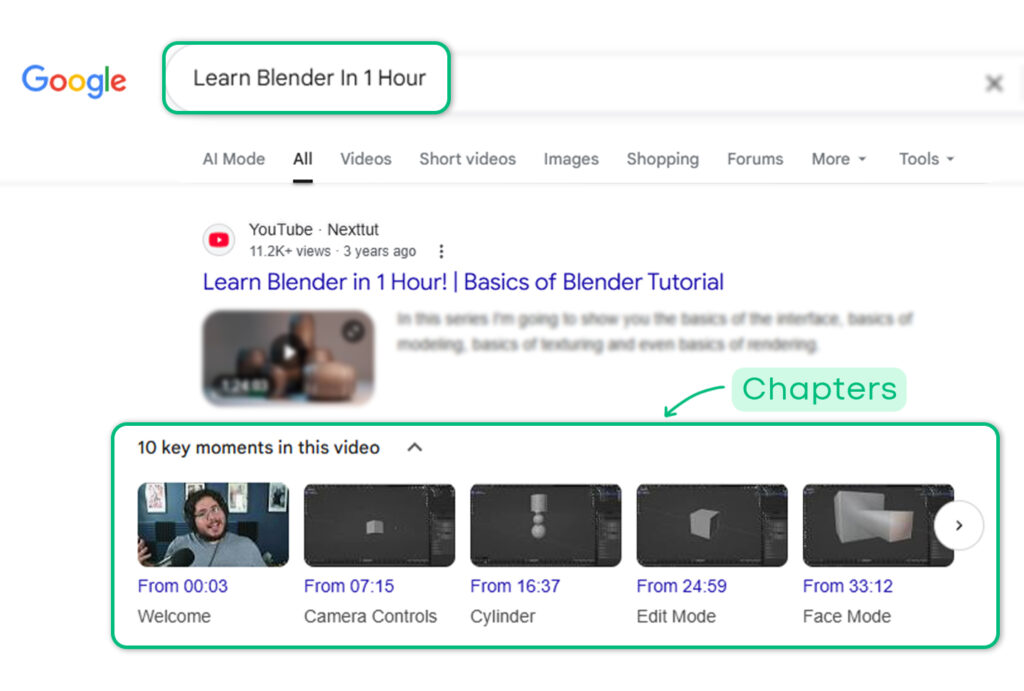
Key Moments In google with multiple click points
For example, someone searches “how to set up a Shopify store.” Your 20-minute tutorial has a chapter called “Adding Your First Product to Shopify.” Google might surface that specific chapter as a Key Moment — even though your video’s main title is broader.
This means a single video can rank for multiple distinct search queries through its individual chapters. In the screenshot above you can look at the key moments for the search term “Learn Blender in 1 Hour”.
How Chapters Become Key Moments
When you add properly formatted timestamps to your video description, starting at 0:00, minimum three chapters, each 10+ seconds, YouTube communicates this structure to Google through structured data (technically called Clip markup). You don’t need to add any code. YouTube handles it automatically when you provide the timestamps.
Google also attempts to identify key segments on its own using AI (called SeekToAction). But Google’s documentation is clear: manually provided chapters are prioritized over auto-detected ones. When you give Google explicit timestamps with descriptive titles, those are what show up as Key Moments.
The pipeline works like this:
Timestamps in description → YouTube chapter markers → Google indexes chapters → Key Moments in search results
Why Key Moments Matter for SEO
One video, multiple rankings
A 20-minute video with 8 well-titled chapters creates 8 potential search entry points. Your video doesn’t just rank for its main keyword, it can surface for every topic covered in its chapters.
This is a multiplier effect that most creators completely miss. They optimize their video title and thumbnail, then leave their chapter titles as generic labels like “Part 1” and “Step 2.” Every generic title is a wasted ranking opportunity.
Higher click-through rate
When a searcher sees that your video has a section specifically titled to match their query, they’re more likely to click. The specificity signals relevance. “Setting Up SSH Keys on Ubuntu” gets more clicks than a generic video titled “Linux Server Tutorial” even if the video is the same.
AI Overviews in 2026
This is the big one that nobody else is talking about yet.
Google’s AI Overviews, the AI-generated answer boxes at the top of search results, increasingly cite specific video segments when generating responses. Particularly for how-to queries, product comparisons, and technical explanations.
Well-structured chapters with clear, descriptive titles make your content more likely to be cited in AI Overviews. When Google’s AI sees a chapter titled “How to Fix WordPress Memory Limit Error,” it can directly reference that segment when someone searches for that exact problem.
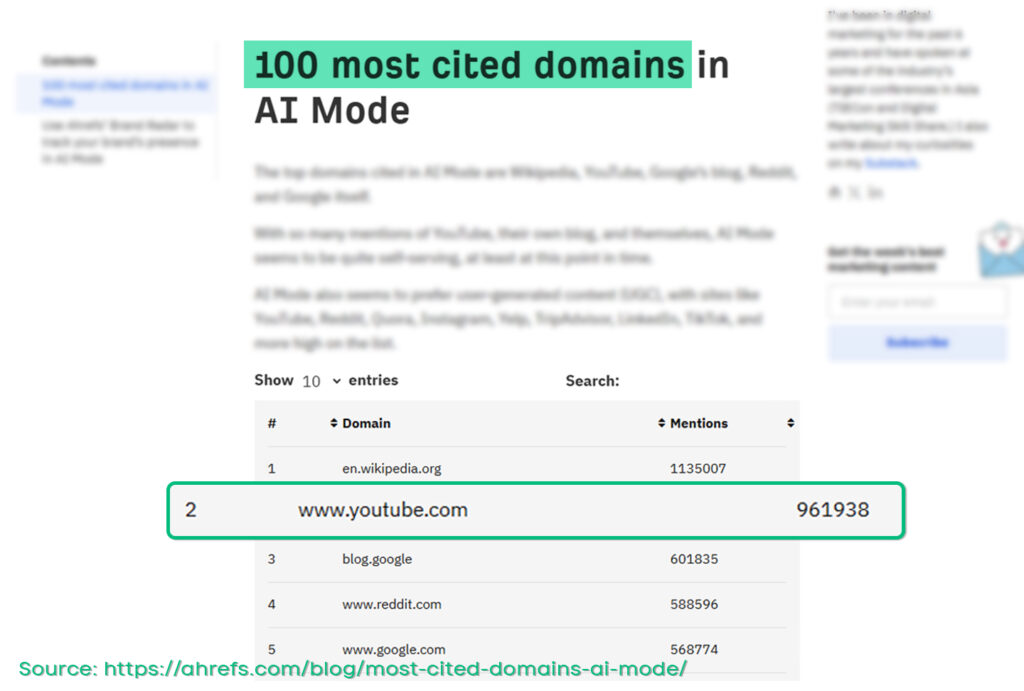
Youtube is 3rd Most Cited domain in Google’s AI mode
This is a new and growing surface area for video SEO. Creators who optimize their chapter titles for AI discoverability now will have a significant advantage as AI Overviews become more prominent in search results.
How to Optimize Chapters for Key Moments
Your chapter titles function as search keywords. Treat each one like a mini page title.
Write titles that match search queries
Ask yourself: would someone type this chapter title into Google? If yes, it has Key Moment potential. If no, rewrite it.
| Weak Title | Strong Title |
|---|---|
| Intro | Introduction to YouTube SEO |
| The Problem | Why YouTube Videos Don’t Get Traffic |
| Solution | How to Optimize YouTube for Google Search |
| Tips | 5 YouTube SEO Tips for Small Channels |
| Wrap Up | YouTube SEO Checklist and Next Steps |
Keep titles under 50 characters
Google truncates longer titles in Key Moment displays. Keep them concise and front-load the most important keywords.
Make titles specific, not clever
“The Secret Sauce” means nothing to Google’s indexer. “Adding Schema Markup to WordPress” tells Google exactly what the section covers and matches a real search query.
Use different keywords across chapters
Each chapter should target a distinct keyword or topic. Don’t repeat the same keyword in every title, spread your coverage across different search queries to maximize your ranking surface area.
For the full formatting guide, see YouTube chapters format explained. For step-by-step setup, see how to add chapters to YouTube videos.
How to Check if Your Key Moments Are Showing
Method 1: Search Google
Search for your video’s topic on Google (not YouTube) and look for your video result. If Key Moments are active, you’ll see clickable timestamp links beneath the thumbnail.
Note: it can take days or even weeks for Google to index and display Key Moments for newer videos. This isn’t instant.
Method 2: Google Search Console
In Google Search Console, go to the Video pages report. This shows whether your videos are generating impressions with Key Moments. You can see which queries are triggering your video’s chapter-level results.
Method 3: Rich Results Test
Use Google’s Rich Results Test (search.google.com/test/rich-results) to check if your video page has valid Clip structured data. Paste your YouTube video URL and look for “Video” results with clip information.
Why Manual Chapters Beat Automatic for Key Moments
YouTube’s auto-generated chapters produce generic titles — “Introduction,” “Main Topic,” “Conclusion.” These carry almost zero SEO value because nobody searches for “Main Topic.”
Manual chapters with keyword-optimized titles give Google specific, searchable labels for each segment. The difference in Key Moment performance between generic auto-titles and well-crafted manual titles is significant.
For a deeper comparison, see automatic vs manual chapters.
Key Moments + AI Chapter Generation
The highest-leverage workflow: use an AI chapter generator to produce chapters with descriptive, keyword-aware title, then review and refine them before pasting into your description.
This gives you:
- Speed (chapters generated in seconds, not 15 minutes of manual work)
- Quality (descriptive titles, not generic labels)
- SEO value (keyword-rich titles that can rank as Key Moments)
- AI Overviews readiness (clear, specific titles that Google’s AI can cite)
Generate SEO-optimized chapters →
FREE TOOL
Generate YouTube Chapters in Seconds
Paste any YouTube URL and get SEO-optimized chapters — correctly formatted, keyword-rich, ready to paste into your description.
Try ChapterFast — It’s Free →No signup required. Generate chapters instantly.